If your Samsung Galaxy S26 Ultra camera is shaking, vibrating, or making the preview jump, don’t panic—this is a common issue that can often be fixed with safe, step-by-step troubleshooting. Whether you’re experiencing focus hunting, OIS rattling, or a jittery video preview, this guide walks you through every solution from quick fixes to advanced repairs.
Why Your S26 Ultra Camera Might Be Shaking
Camera shaking on the Galaxy S26 Ultra can stem from several causes, and understanding the difference is key to fixing it properly.
Common Causes:
- Optical Image Stabilization (OIS) Rattle – A small clicking or rattling noise when the camera is not open is normal on phones with OIS.
- Focus Hunting – The camera repeatedly tries to focus, causing the preview to “pulse” or jump, often due to smudges, glare, or low light.
- Case or Magnetic Interference – Thick cases, lens protectors, or magnetic accessories near the camera can physically interfere with stabilization.
- Software Glitches After Updates – Camera or system updates can occasionally trigger stabilization or focus bugs.
- Hardware Issues – If shaking persists across apps and after all safe checks, the OIS or focus module may need service.
Methods to Fix Camera Shaking on your Samsung S26 Ultra
If you’re experiencing camera shaking on your Galaxy S26 Ultra, here’s a comprehensive guide to diagnosing and fixing the issue.
Fix #1: Enable Super Steady with Horizontal Lock
The Galaxy S26 Ultra comes with a next-generation stabilization feature that many reviewers have called “a gimbal in the form of a software toggle”. Super Steady with Horizontal Lock is arguably the most powerful stabilization tool on any smartphone today.
What it does
Super Steady reduces camera shake during movement, while Horizontal Lock adds rotation correction that keeps the horizon level—even if the phone tilts or rotates a full 360 degrees during recording. Popular YouTuber MKBHD demonstrated that with Horizon Lock enabled, the Galaxy S26 Ultra produces what he called the best smartphone stabilization he’s ever seen.
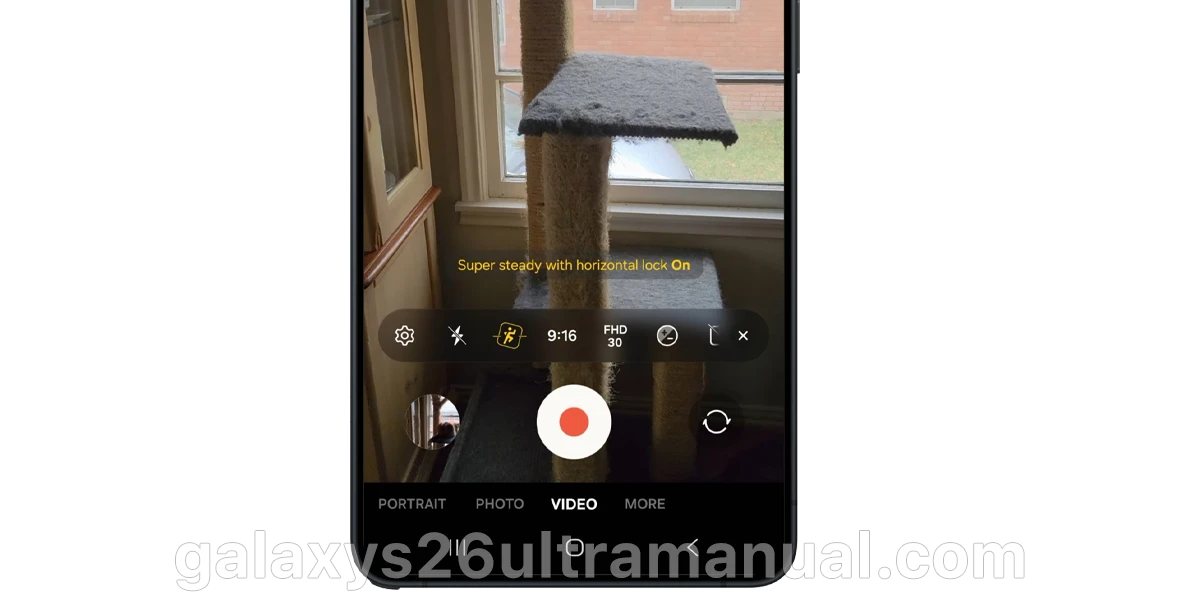
How to enable it:
- Open the Camera app.
- Swipe to Video mode on the capture modes bar.
- Tap the Super Steady icon (running figure) in the viewfinder toolbar, located next to the flash icon.
- Select Horizontal Lock from the pop-up menu.
Note: Stabilized video with Horizontal Lock tops out at QHD resolution rather than 8K, and zoom is limited to 2x. For social media content, this trade-off is well worth the dramatically smoother footage.
Fix #2: Adjust Lens Switching Behavior
One subtle but frustrating issue on the Galaxy S26 Ultra is abrupt lens switching during video recording. Transitions between 1x, 3x, and 5x zoom can feel jarring, with sudden focus jumps that create a shaky, unprofessional look.
The hidden fix:
Samsung quietly introduced controls inside Camera Assistant that let you smooth out these transitions:
- Open Camera Assistant (downloadable from the Galaxy Store if not pre-installed).
- Look for Autofocus Transition Speed – set it to very slow to allow focus to move gradually between lenses.
- Adjust Shift Sensitivity – set it to fast to keep the camera responsive when the scene actually changes.
This combination produces smoother transitions, more natural focus movement, and footage that feels closer to a controlled cinematic capture.
Fix #3: Disable Auto Lens Switching (for Photos)
If you’re experiencing blurry or inconsistent photos, the culprit might be the phone’s automatic lens switching feature. By default, the Galaxy S26 Ultra automatically switches between its four rear cameras based on lighting, distance, and zoom range.
How to disable it:
- Open Camera Assistant.
- Scroll down to Photos settings.
- Disable Auto Lens Switching.
This gives you full control over which lens is active, eliminating unexpected shifts that can cause momentary blur.
Fix #4: Clear Camera Cache and Reset Settings
Sometimes camera shake or jitter is caused by software glitches rather than hardware issues. A quick reset often resolves these problems.
Clear cache:
- Go to Settings > Apps > Camera.
- Tap Storage.
- Tap Clear Cache (do not tap Clear Data unless you want to lose all camera settings).
Reset camera settings:
- Open the Camera app.
- Tap the Settings gear icon.
- Scroll down and select Reset Settings.
- Restart the device.
After clearing cache and resetting settings, restart your phone. This ensures all camera modules are properly recalibrated.
Fix #5: Update Your Software
Samsung has acknowledged and fixed several camera-related bugs on the Galaxy S26 Ultra through software updates. A notable example is the 3x zoom blur issue, which caused brief screen movement and corner blurriness. Samsung confirmed this was a software bug—not a hardware defect—and addressed it in the April 2026 security patch.
How to check for updates:
- Go to Settings > Software update.
- Tap Download and install.
- After installation completes, restart your device.
Keeping your software up to date ensures you have the latest stabilization patches and camera optimizations.
Fix #6: Clean the Lens
It sounds simple, but dust, smudges, or fingerprints on the lens can interfere with autofocus and create blurry or shaky-looking images.
How to clean properly:
- Use a soft, dry, lint-free cloth.
- Gently wipe the camera lens and the surrounding camera frame.
- Avoid using liquids or abrasive materials.
Fix #7: Physical Wobble on Flat Surfaces
The Galaxy S26 Ultra’s impressive camera system comes with a trade-off: a prominent camera bump that causes the phone to wobble when placed on a flat surface. This is a physical design issue, not a camera malfunction, but it can make using the S-Pen or typing on a desk frustrating.
What doesn’t work:
Contrary to previous Galaxy generations, a standard case won’t fix this issue on the S26 Ultra. The camera bump is simply too prominent.
What does work:
- Use a kickstand accessory – A small stick-on kickstand attached to the back can lift the phone enough to eliminate wobble.
- Place the phone on a soft surface – A mousepad, notebook, or folded cloth can provide a level base.
- Hold the phone while using the S-Pen – The wobble is most pronounced when the phone is flat on a table.
Fix #8: What About OIS Rattling?
You may hear a small rattling noise when you shake your Galaxy S26 Ultra. This is completely normal—it’s the Optical Image Stabilization (OIS) mechanism moving freely when the camera is not in use. The OIS system detects hand shaking and corrects the lens by moving it in the opposite direction.
If you hear rattling while actively recording or experience extreme blurriness that doesn’t resolve with the fixes above, the OIS mechanism may be stuck. In this case:
- Gently tap the phone on your palm to try to free a stuck lens.
- If the issue persists, contact Samsung support or visit an authorized service center.
Final Thoughts
The Samsung Galaxy S26 Ultra’s camera system is remarkably capable, and in most cases, camera shake can be resolved through the right settings and software updates. The new Horizontal Lock feature alone eliminates the need for external gimbals in most everyday scenarios.
For the best results, enable Super Steady with Horizontal Lock for video, keep your software updated, and don’t forget the basics like keeping your lens clean.
If you’ve tried all these fixes and still experience severe shaking or blurring, it’s worth visiting an authorized Samsung service center—you may be dealing with a hardware defect that requires professional attention.
4 thoughts on “How to Fix Camera Shaking on Samsung Galaxy S26 Ultra | Troubleshooting Guide”