Setting up your email on a smartphone should be quick and easy, but sometimes automatic setup doesn’t work as expected. If you use a Hotmail or Outlook.com email account, you may need to configure it manually on your Samsung Galaxy S26 Ultra. This guide provides clear, professional instructions to Add Hotmail on Galaxy S26 Ultraf using the official Microsoft Outlook application.
Why Use the Outlook App for Hotmail on Samsung S26 Ultra
The Microsoft Outlook app offers several advantages over the default Samsung Email app when managing Hotmail accounts.
Microsoft optimized this application specifically for Hotmail, Outlook.com, and Live.com addresses, ensuring automatic configuration and enhanced security through modern authentication protocols.
Microsoft requires all users to comply with modern authentication standards, making the dedicated Outlook app essential for maintaining secure access to your email accounts.
The app also provides a unified inbox feature, allowing you to manage multiple email accounts from different providers in one centralized location.
Prerequisites Before Setup
Before proceeding to add Hotmail using Outlook app on Galaxy S26 Ultra, ensure you have the following:
- Active Hotmail account with valid credentials.
- Galaxy S26 Ultra with internet connectivity.
- Microsoft Outlook app installed from Google Play Store.
- Updated device software to ensure compatibility.
Steps to Manually Add Hotmail on Samsung S26 Ultra
Follow these steps to manually set up your Hotmail or Outlook.com account using the email setup wizard.
Step 1: Open Microsoft Outlook App
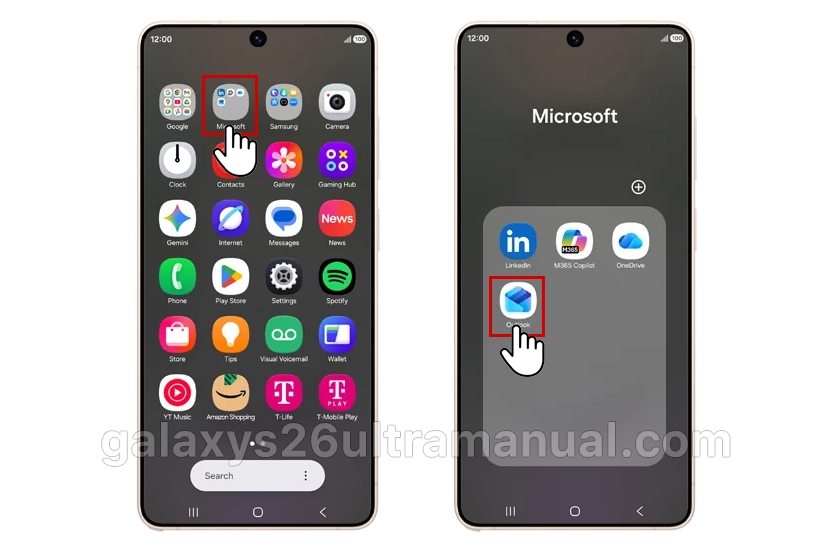
On your phone, find the Microsoft folder and tap Outlook.
Step 2: Begin Account Setup
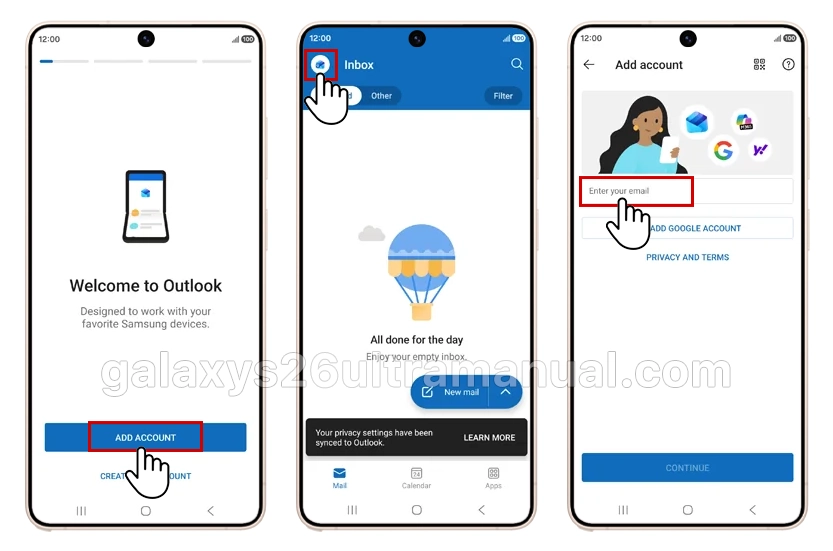
When you first open the Outlook app, tap Get Started to initiate the setup process. If you have used the app previously, tap your profile icon in the upper left corner, then select the Settings gear icon followed by Add Account.
Step 3: Enter Your Hotmail Credentials
Enter your full Hotmail email address in the provided field. Tap the Continue button or check mark to proceed.
The app will automatically detect that you are adding a Microsoft account and redirect you to the Microsoft sign-in page.
Step 4: Authenticate Your Account
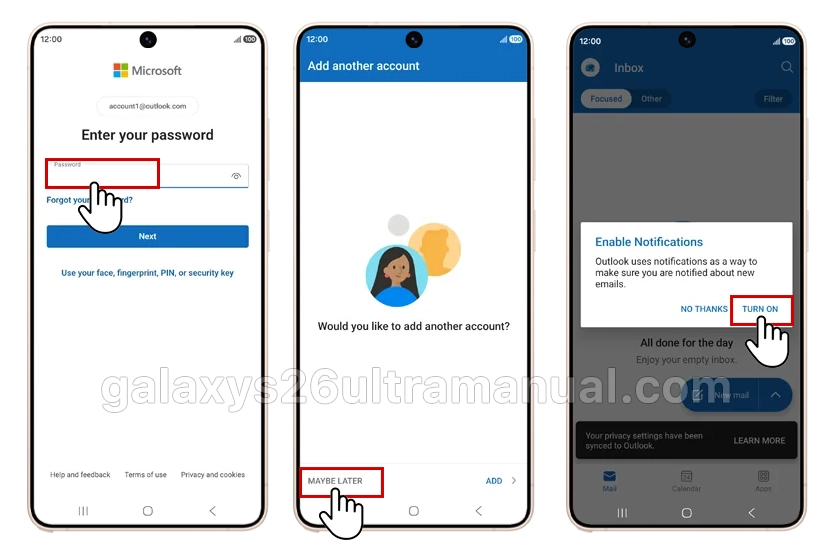
Enter your Hotmail password on the Microsoft authentication screen. If you have enabled two-factor authentication, complete the verification process using your preferred method (authenticator app, SMS code, or backup email). Tap Sign In to continue.
Step 5: Grant Necessary Permissions
The Outlook app will request permissions to access your calendar, contacts, and notifications.
Review these permissions carefully and tap Allow to enable full synchronization across your Galaxy S26 Ultra. These permissions ensure your email, calendar events, and contact information remain current.
Step 6: Complete Synchronization Settings
Once authenticated, the app will automatically configure server settings for your Hotmail account. You can customize sync frequency, notification preferences, and signature settings by accessing the Settings menu within the Outlook app.
Tap the menu icon (three horizontal lines) in the upper left corner, select the gear icon, and choose your Hotmail account to modify these options.
Troubleshooting Common Setup Issues
If the setup fails, try these quick fixes:
Authentication Errors
If you encounter authentication errors when attempting to add Hotmail using Outlook app on Galaxy S26 Ultra, verify that you are entering the correct email address and password.
Microsoft accounts now require modern authentication, so ensure your account has not been flagged for security review.
Sync Problems
When emails fail to synchronize, check your internet connection and confirm the Outlook app has the necessary permissions enabled. Navigate to Settings > Apps > Outlook >
Permissions on your Galaxy S26 Ultra to verify access to storage, calendar, and contacts.
Multiple Account Management
To add additional Hotmail or Outlook accounts, tap your profile picture in the upper left corner of the Outlook app, select the gear icon for Settings, then tap Add Mail Account. This process allows you to manage multiple Microsoft email addresses within the same application.
Conclusion
Adding Hotmail using Outlook app on Galaxy S26 Ultra is a straightforward process that provides secure, synchronized access to your Microsoft email account. By following the steps outlined in this guide, you can configure your Hotmail account within minutes and enjoy seamless email management on your Samsung device.
The Outlook app remains the recommended solution for Galaxy S26 Ultra users, offering automatic configuration, modern authentication security, and unified inbox capabilities for managing multiple email accounts efficiently.
2 thoughts on “How to Add Hotmail on Galaxy S26 Ultra: Complete Setup Guide”